
Device alerts by email
RDS can email you when a screen stops connecting to the server and when it comes back. It is set up per company in Profile → Alerts.
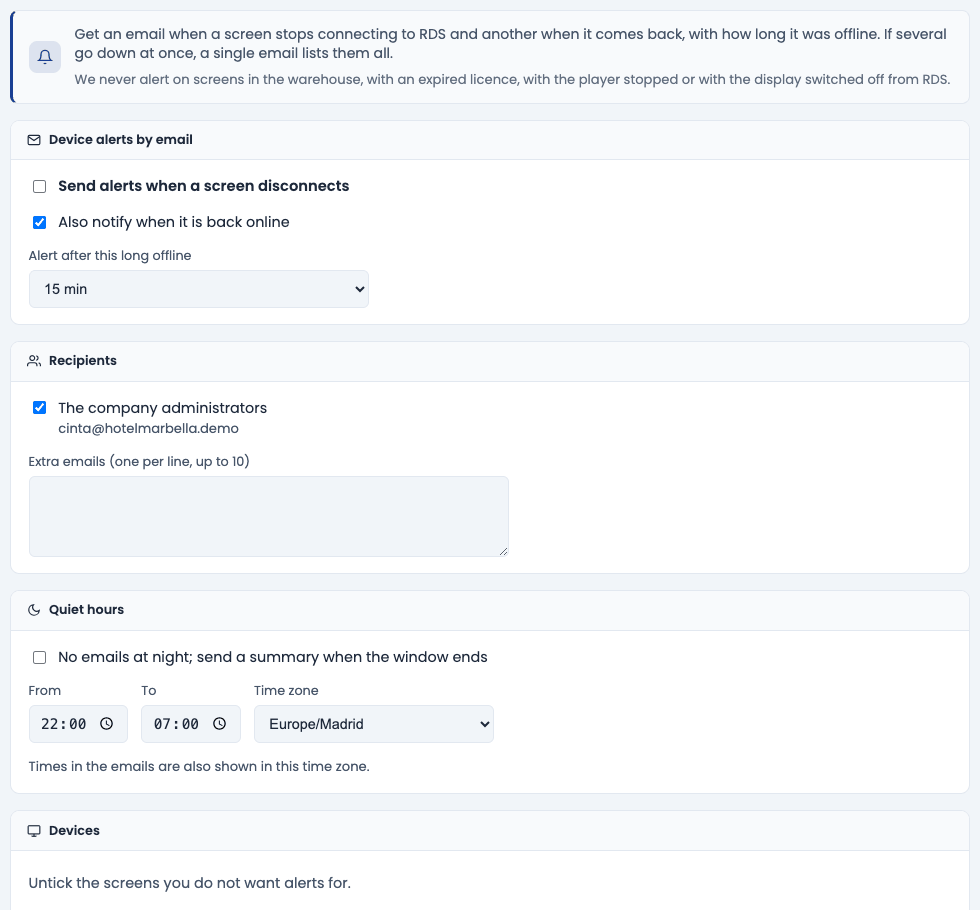
Alerts start switched off. No email is sent until a company administrator ticks Send alerts when a screen disconnects and presses Save.
Who can set them up
Users whose group may modify screens and who are not restricted to one branch. Other users see the Your subscription card: whether they receive the alerts, at which address, and a link to unsubscribe.
Settings
| Setting | What it does |
|---|---|
| Send alerts when a screen disconnects | Turns alerts on for the whole company. |
| Also notify when it is back online | Sends a second email when the screen comes back, with how long it was offline. |
| Alert after this long offline | 5, 10, 15 (default), 30, 60 or 120 minutes without connecting before an alert. |
| The company administrators | Users who may modify screens and are not restricted to one branch. Each gets the email in their own language. |
| Extra emails | Up to 10 more addresses, one per line (for example, your maintenance technician). |
| Quiet hours | With No emails at night; send a summary when the window ends, nothing is sent between From and To; when the window ends you get one summary of what is still offline and what went down and came back. Times follow the chosen Time zone, which the emails also use. |
| Devices | Untick the screens you do not want alerts for. |
Send me a test email sends an example to your own address so you can check it arrives. You can repeat it after a few minutes.
How they are sent
- A screen counts as offline once it has not connected to RDS for the chosen time. The email goes out about 2 minutes later, so screens that drop together are grouped: if several fail at once (a power cut or internet outage at the site), you get one email listing them all.
- If the screen comes back before the email goes out, nothing is sent.
- The back-online email is only sent if the offline email was sent, and it says how long the screen was offline.
- A screen that keeps dropping and coming back does not produce a stream of emails: after a back-online email, the next drop needs a longer offline time before it alerts again.
- Each email links to every screen it mentions: the link opens its Device panel (when you are signed in).
- When alerts are switched on, or a screen is added, RDS records the current state silently: you will never get an email about screens that were already off.
When no alert is sent
- Screens in the warehouse, manually enabled or not yet activated.
- Screens whose licence has expired.
- Screens with the player stopped or the display switched off from RDS.
- Linux or Windows screens (agent 2.0.4 or later) where someone pressed Exit kiosk. On Android, Exit the app does produce an alert after the chosen time.
- During a screen's scheduled restart an extra 15 minutes of grace is given.
- If the problem is on our platform (many screens of many customers stop connecting at the same time), customers are not emailed: our team is alerted instead. Screens still offline once things are back to normal are alerted as usual.
Unsubscribing
Every email has an unsubscribe link. It only affects that address; the other recipients keep getting alerts. In Profile → Alerts, an administrator sees unsubscribed addresses under Unsubscribed with the link in the email and can press send alerts to it again.